Voucher
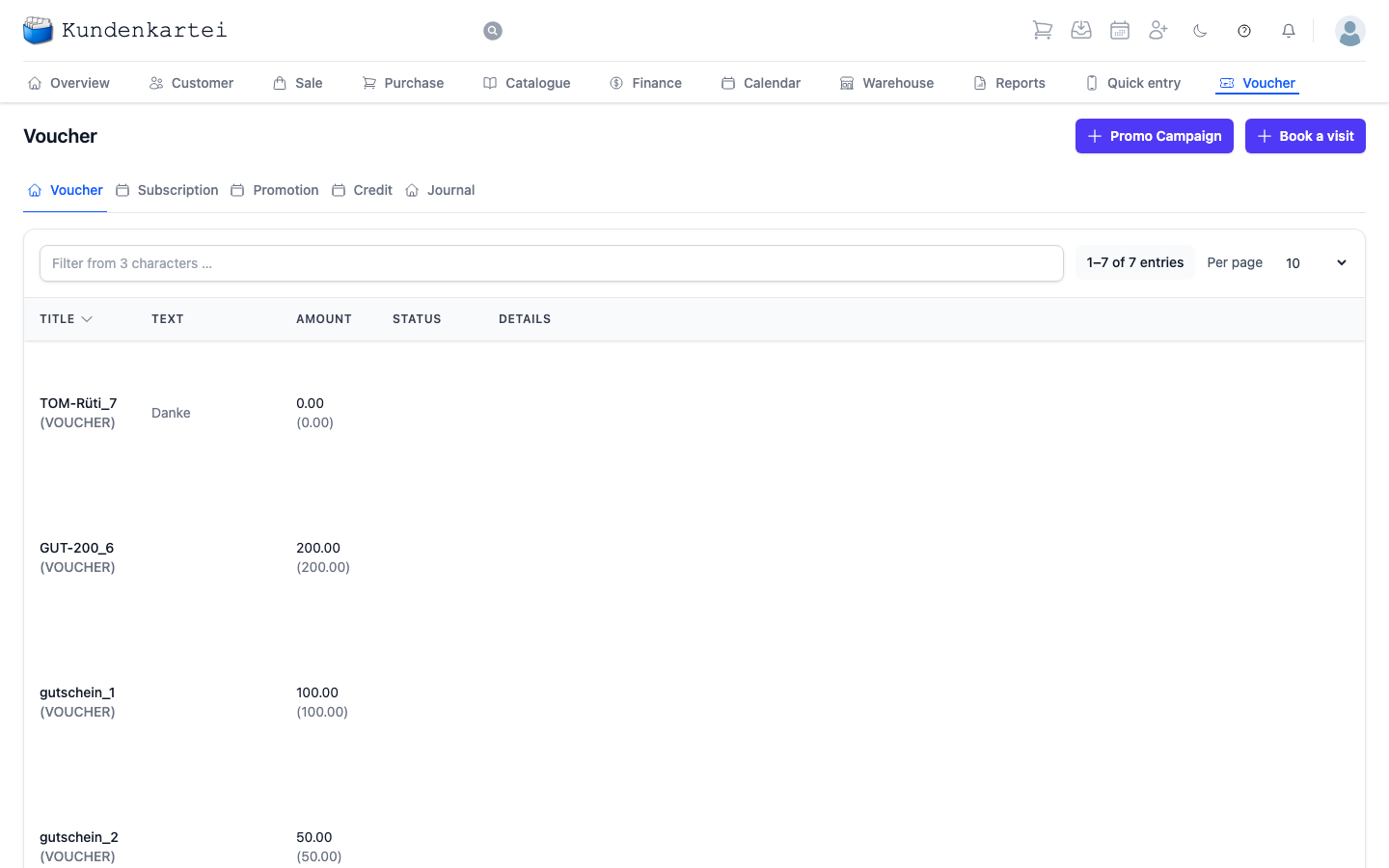
Voucher gathers everything that represents a value to the customer without her paying for it at the time: vouchers, subscriptions, promotions and credits.
The five tabs
| Tab | What it holds |
|---|---|
| Voucher | vouchers issued, with their value |
| Subscription | running subscriptions, a course of treatments for instance |
| Promotion | campaigns acting on articles or customer groups |
| Credit | balances from returns or goodwill |
| Journal | every movement, in chronological order |
The Journal is the answer to “who redeemed what, and when?”. The other four show balances; the journal shows movements.
The two buttons at the top
Promo Campaign creates a new campaign. Book a visit deducts one visit from a running subscription — the handle you will reach for most often when a customer uses her ten-visit card.
What a row shows
| Column | Content |
|---|---|
| Title | the code, with the type in brackets below |
| Text | the text recorded with the voucher |
| Amount | the value still left |
| Status | how far the voucher has been used up |
| Details | further remarks |
The customer redeems the voucher with the code. The text is often empty.
Clicking a row opens the entry: title, status, validity, remaining credit and code, with the bookings below. For a voucher, each booking shows Date, Customer, Order no., the amount Redeemed and the Remaining amount; for a subscription, Date and Points.
The status
The Status column tells you at a glance where you stand:
| Status | What it means |
|---|---|
| Open | issued, nothing redeemed yet |
| Partly redeemed | part has been redeemed, a remainder is still open |
| Fully redeemed | redeemed in full |
| Expired | the validity has run out |
| Cancelled | taken back |
Taking back
You take back a wrong redemption of a voucher in the opened voucher: Cancel booking on the booking. The application asks first — “Cancel this booking? The remaining value will go back up.” The booking then stays in the list marked “Cancelled” and no longer counts.
You remove a whole entry with Delete at the bottom of the opened entry. If it already has bookings, the application asks a second time: “This voucher has bookings. They will be deleted with it.” Only Delete with history removes it together with its bookings.
Where to begin
- A customer is using her card — Book a visit
- Is the voucher still valid? The Status column — “Expired”, “Fully redeemed” or “Cancelled” means no
- Redeemed by mistake? Open the voucher, Cancel booking on the booking
- What has been redeemed? The Journal tab
- Starting a campaign — Promo Campaign
Next
- Creating and managing vouchers and promotions — step by step
- Creating an order — where a voucher is redeemed
- Finance — how this affects the books